

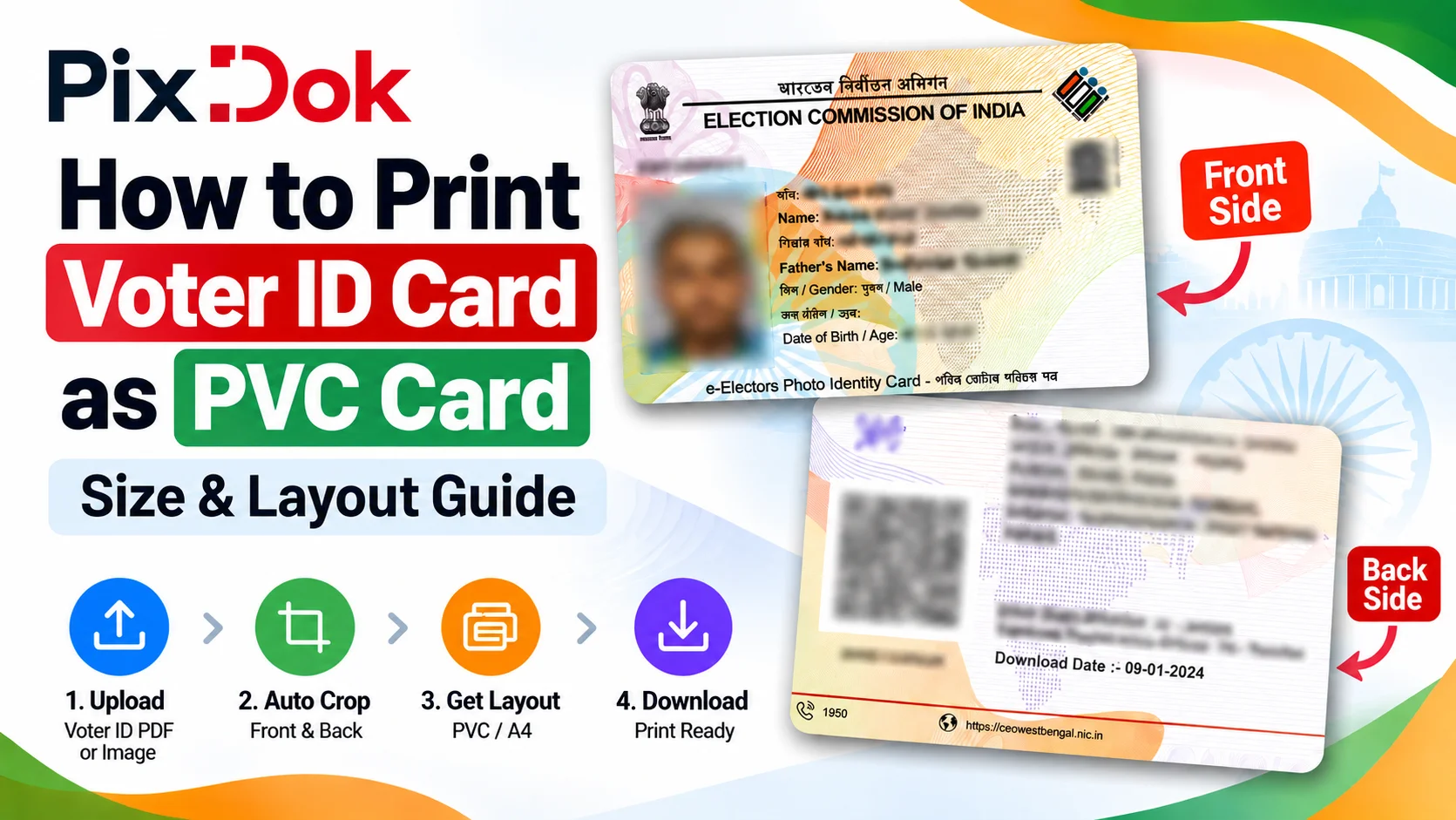
If you already have your official Voter ID or digital e-EPIC PDF, you can prepare it for wallet-sized PVC printing by cropping and arranging the front and back sides into a suitable card layout.
PixDok's Voter ID to PVC Card Maker can automatically crop the front and back of a supported Voter ID PDF or image and create a print-ready card layout.
👉 Prepare your Voter ID for PVC printing:
PixDok Voter ID to PVC Card Maker
Important: PixDok is not a government Voter ID issuing service. It does not issue, replace, verify, or authenticate official Voter ID cards. It is a print-layout tool for documents you already have.
What Is a Voter ID PVC Card?
A Voter ID PVC card is a wallet-sized physical representation of your existing voter identification document.
The Election Commission of India provides voters with digital e-EPIC services. If you already have an e-EPIC PDF or a suitable Voter ID image, you can prepare that document for physical printing.
PixDok's Voter ID to PVC Card Maker prepares the supplied document into a CR80-style print layout, a common wallet-card format.
Format Voter ID for standard PVC printing.
Try Voter ID to PVC NowVoter ID Card Size in mm, cm and inches
Many people search for the Voter ID card size before preparing a card for printing.
A standard ID-1 card, commonly used for wallet-sized identification cards, measures approximately:
-
85.60 mm × 53.98 mm
-
8.56 cm × 5.40 cm
-
3.37 × 2.125 inches
This is the standard ID-1/CR80 reference size commonly used when preparing a wallet-sized PVC card layout.
How to Convert Voter ID to PVC Card Online
If you already have your Voter ID PDF or image, the process is simple.
Step 1: Open the PixDok Voter ID PVC Card Maker
Open the PixDok Voter ID to PVC Card Maker.
The tool is designed to process an official e-EPIC PDF or a clear Voter ID image.
Step 2: Upload Your Voter ID
Upload your Voter ID PDF or image.
PixDok can automatically identify and crop the relevant front and back card panels from supported files.
Step 3: Process the Card
Click the processing option to generate the PVC card layout.
The tool automatically handles the card cropping and positioning.
Step 4: Check the Front and Back
Preview both sides of the generated card.
Check the crop, alignment, text, photograph, and other visible details before printing.
Step 5: Download the Print-Ready Layout
After signing in, you can unlock the high-resolution output and download the prepared card layout.
PixDok also provides a combined A4 layout for printing.
Voter ID PVC Card Size in mm
One of the most common questions is:
What is the Voter ID PVC card size?
For a standard ID-1/CR80-style card, the dimensions are:
85.60 mm × 53.98 mm
For practical purposes, this is commonly referred to as approximately:
85.6 mm × 54 mm
At 300 DPI, this is approximately:
1012 × 638 pixels
PixDok prepares the card layout around this standard wallet-card format.
What Resolution Should a Voter ID PVC Card Use?
For high-quality printing, 300 DPI is commonly used for ID-card layouts.
At approximately 300 DPI, an ID-1 card is around:
1012 × 638 pixels
Higher-quality source material is important because text, photographs, QR codes, and other details can become blurry when the original file is low resolution.
If your original Voter ID image is poor quality, converting it to PVC dimensions cannot restore missing detail.
How to Print Voter ID as a PVC Card
There are several ways to print a prepared Voter ID layout.
Option 1: PVC Card Printer
A dedicated PVC card printer can print directly onto compatible CR80 PVC cards.
This type of printing is commonly used by professional card-printing businesses and service centers.
Option 2: A4 Paper and Lamination
You can also print a prepared layout on suitable paper or photo stock, cut the card to the required dimensions, and laminate it.
For this method, always check your printer's scaling settings.
Select:
Actual Size / 100%
rather than:
Fit to Page
Incorrect scaling can change the final card dimensions.
Option 3: Printable PVC Sheets
Some printers support special printable PVC sheets or similar card-printing media.
Always follow the manufacturer's instructions for the printer and printing media you use.
How to Get Your Official Voter ID Online
Before preparing a Voter ID for PVC printing, you need an official voter document.
The Election Commission of India provides online voter services through its official Voters' Services Portal.
Official services include voter registration, application tracking, electoral-roll services, updating voter information, and downloading e-EPIC.
👉 Official Voter Services:
ECI Voters' Services Portal
Do not enter your personal voter information into unofficial websites claiming to issue government Voter IDs.
Voter ID Card Online Apply: How to Apply for a New Voter ID
If you are not yet registered as a voter, use the official Election Commission process rather than PixDok.
New general voters can register through the official voter-services system using Form 6.
👉 Apply through official Voter Services:
ECI Voters' Services Portal
PixDok is not a voter-registration website.
Its purpose is to help users prepare an existing Voter ID document for printing.
Voter ID Form 8 Online Apply: What It Is and Where to Submit It
Form 8 is used for certain updates to an existing electoral-roll entry.
It can be used for services including:
-
Shifting of residence
-
Correction of entries
-
Replacement of EPIC
-
Marking of PwD status
To apply, submit Form 8 through the official ECI voter-services system.
👉 Official Voter Services:
ECI Voters' Services Portal
Important: Do not use PixDok to apply for Form 8.
PixDok only processes the Voter ID document you provide and prepares it for printing.
How to Check Voter ID Application Status
If you have already submitted a voter-related application, you can check its status through the official Election Commission services.
The ECI provides an online application-status service through the Voters' Services Portal.
👉 Check your official application status:
ECI Voters' Services Portal
You may need the reference or application information associated with your submission.
Voter ID Card Check Online: How to Search Your Name in the Electoral Roll
Checking an application is different from checking whether you are registered as a voter.
If you want to check your Voter ID information online, use the official electoral-roll search.
The Election Commission's Voters' Services Portal provides voter-search services. Depending on the options available on the portal, you can usually search using your personal details or EPIC/Voter ID number.
Use this service to:
-
Confirm that your name is in the electoral roll
-
Find your details in the voter list
-
Check your EPIC number and other listed information
👉 Search the electoral roll:
ECI Voters' Services Portal
Search options can change over time, so follow the steps shown on the live official portal.
PixDok does not search electoral rolls or verify voter registration.
Voter ID Card PDF Download: Get Your e-EPIC, Then Prepare It as a PVC Card
The e-EPIC is the electronic version of the Elector Photo Identity Card.
The Election Commission provides an official e-EPIC download service through its voter-services system.
👉 Download your e-EPIC:
ECI Voters' Services Portal
Once you have your official e-EPIC PDF, you can use a suitable document or image tool to prepare it for printing.
A simple workflow is:
e-EPIC PDF → PixDok → Crop & Align → PVC/A4 Print Layout
How to Prepare e-EPIC for PVC Printing
If you have already downloaded your e-EPIC PDF, you don't need to manually crop every section in Photoshop or another image editor.
PixDok's Voter ID to PVC Card Maker is designed specifically for this workflow.
👉 Open PixDok Voter ID to PVC Card Maker
The tool can:
-
Accept a Voter ID PDF or image
-
Automatically crop the front and back
-
Prepare a wallet-sized card layout
-
Preview both sides
-
Create a print-ready layout
-
Generate an A4 print arrangement
-
Provide high-resolution output after sign-in
Voter ID PVC Card Front and Back
A Voter ID document can contain information on both sides.
When preparing a card for printing, both sides need to be aligned correctly.
PixDok's tool is designed to extract and present the front and back panels together so they can be reviewed before printing.
Always check your preview carefully before printing.
Make sure:
-
The complete card is visible
-
No important information is cropped
-
The front and back are aligned correctly
-
The card dimensions are correct
-
Printer scaling is set appropriately
PVC Voter ID Card Order Online vs Print Layout
You may see searches such as:
-
PVC Voter ID card order online
-
Voter ID PVC card print order online
-
Voter ID download PVC card
-
PVC Voter ID card print
These searches can refer to different services.
If you want to apply for, update, replace, or obtain an official voter document, use the official Election Commission services.
If you already have your Voter ID/e-EPIC and simply want to prepare the document for PVC printing, PixDok can help with the print layout.
Official voter service:
ECI Voters' Services Portal
PVC print-layout tool:
PixDok Voter ID to PVC Card Maker
This distinction is important because PixDok does not issue an official government Voter ID or take PVC card orders.
Can I Print My Voter ID at Home?
Yes, you can prepare a printable layout and use compatible printing equipment at home.
For example, you can:
-
Obtain your official e-EPIC.
-
Upload the PDF to PixDok.
-
Generate the front and back layout.
-
Download the print-ready output after signing in.
-
Print using suitable paper, card stock, or compatible PVC media.
-
Cut or process the card according to your printing method.
When printing an A4 layout, use 100% / Actual Size if you need the output to retain its intended dimensions.
Is PixDok an Official Government Voter ID Website?
No.
PixDok is an independent document and image utility.
It does not:
-
Issue Voter IDs
-
Register voters
-
Approve voter applications
-
Replace government-issued EPIC documents
-
Verify voter eligibility
-
Process Form 8 applications
-
Authenticate government identity documents
The Election Commission of India is the official authority for electoral services.
Use the official ECI voter-services portal for applications, updates, status checking, voter search, and e-EPIC services.
Is My Voter ID Stored Permanently by PixDok?
PixDok's Voter ID tool uses a temporary-processing workflow with automatic cleanup after processing.
Because Voter ID contains personal information, always review the privacy information of any online document service before uploading sensitive documents.
Why Use PixDok for Voter ID PVC Printing?
Preparing a card manually can require image-editing software and careful measurement.
PixDok simplifies the process by automating the layout.
Automated Cropping
The tool automatically extracts the relevant card panels from supported files.
Standard Card Dimensions
The output is prepared around a standard wallet-sized ID-card format.
Front and Back Layout
Both sides can be previewed before printing.
A4 Print Layout
The tool can create a combined A4 layout for printing.
Browser-Based
You can use the tool from a supported browser without installing desktop design software.
Temporary Processing
Uploaded files are processed temporarily rather than being maintained as a permanent document database.
Voter ID PVC Card: Official Service vs PixDok
| Requirement | Where to go |
|---|---|
| Apply for a new voter registration | ECI Voter Services |
| Form 8 / correction / shifting / replacement | ECI Voter Services |
| Check application status | ECI Voter Services |
| Check your name in the electoral roll | ECI Voter Services |
| Download e-EPIC / Voter ID PDF | ECI Voter Services |
| Prepare an existing Voter ID for PVC printing | PixDok |
| Crop front and back for printing | PixDok |
| Create a print-ready PVC/A4 layout | PixDok |
The official Election Commission services and PixDok therefore serve different purposes.
Frequently Asked Questions
Yes. If you already have an official Voter ID PDF or suitable image, you can use PixDok to prepare a printable PVC card layout.
PixDok does not take PVC card orders or issue Voter IDs.
For official applications, replacements, and updates, use the Election Commission of India's voter-services portal.
If you already have your e-EPIC, PixDok can prepare the print layout so you can print it yourself or take it to a printing service.
A standard ID-1 card is approximately 85.60 mm × 53.98 mm, or 8.56 cm × 5.40 cm.
For a wallet-sized ID-1/CR80-style layout, the reference dimensions are approximately 85.6 mm × 54 mm.
You can download the electronic e-EPIC through the official Election Commission voter-services system.
Download your e-EPIC PDF from the official ECI portal, upload it to PixDok to crop and align the front and back, then print the prepared layout using a compatible PVC printer, printable PVC media, or another suitable printing method.
New general voters can use the official Election Commission voter-services system and Form 6 for new registration.
Submit Form 8 through the official ECI voter-services system.
It can be used for services including shifting residence, correcting electoral-roll entries, replacing an EPIC, and marking PwD status.
PixDok cannot submit Form 8 for you.
Use the official Election Commission Voters' Services Portal to track submitted applications.
Use the electoral-roll search on the official ECI Voters' Services Portal to check whether your name and details appear in the voter list.
No. PixDok only prepares existing Voter ID documents for printing. It does not issue or authenticate government Voter IDs.
You can prepare an existing Voter ID/e-EPIC document into a suitable print layout and use compatible PVC printing equipment or another suitable printing method.
Yes. PixDok can create a combined A4 layout containing the front and back sides for printing.
Around 300 DPI is commonly used for high-quality ID-card printing. PixDok prepares its card output at high resolution.
No. PixDok is an independent online print-layout tool.
Official voter services should be accessed through the Election Commission of India's voter-services system.
For practical purposes, this is commonly referred to as approximately:
At 300 DPI, this is approximately:
1012 × 638 pixels
PixDok prepares the card layout around this standard wallet-card format.
Prepare Your Voter ID for PVC Printing
If you already have your official Voter ID or e-EPIC PDF and want to turn it into a clean, wallet-sized print layout, PixDok can handle the cropping and alignment for you.
👉 Try PixDok Voter ID to PVC Card Maker
For official voter registration, Form 8 applications, application tracking, electoral-roll search, and e-EPIC downloads, always use the Election Commission of India's official voter-services portal:
PixDok prepares your existing document for printing; the Election Commission of India remains the official source for voter-related government services.