

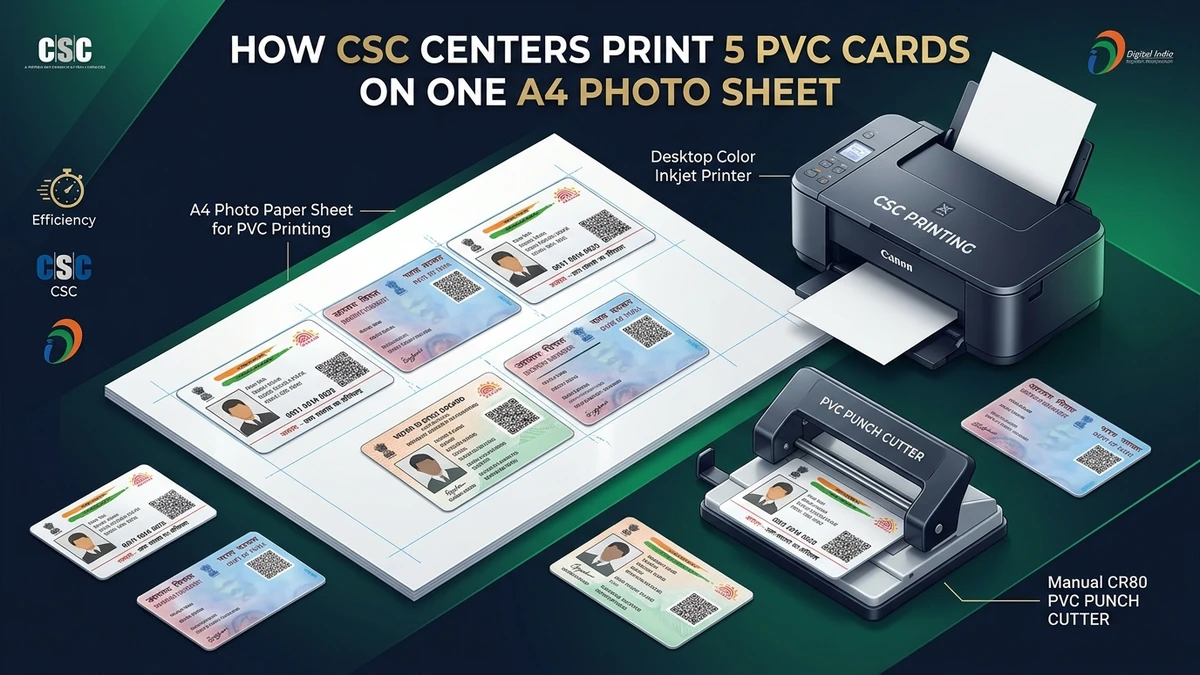
For Common Service Centre (CSC) operators, cyber cafe owners, and digital printing shopkeepers across India, identity card printing is one of the highest-frequency daily services. Whether a customer brings an e-Aadhaar, an e-PAN from NSDL or UTI, an election e-EPIC Voter card, or an Ayushman Bharat PM-JAY card, clients expect a durable, wallet-sized PVC card formatted to exact ATM card specifications.
However, printing cards one at a time on dedicated PVC thermal card printers can be slow and expensive. In contrast, printing 5 cards on a single A4 photo sheet using an inkjet printer and laminating with high-micron pouches delivers bank-grade durability at a fraction of the hardware and consumable cost.
In this technical guide, we detail the complete standard operating procedure (SOP), exact layout calculations, printer driver settings, and finishing steps required to print 5 professional-grade CR80 cards on one A4 sheet without complex Photoshop actions or manual alignment mistakes.
The Geometry of Printing 5 Cards on One A4 Sheet
To produce cards that fit seamlessly into wallets and ID card holders, physical identity cards must adhere to the international ISO/IEC 7810 ID-1 (CR80) standard:
- Standard Width: 85.60 mm (3.370 inches)
- Standard Height: 53.98 mm (2.125 inches)
- Standard Corner Radius: 3.18 mm rounded corners
- Digital Target Resolution: 1011 × 638 pixels at 300 DPI
A standard international A4 sheet measures 210 mm × 297 mm (2480 × 3508 pixels at 300 DPI). Here is how a 5-card layout is mathematically distributed on an A4 sheet:
| Dimension Metric | Single Card (Front + Back) | 5-Card A4 Layout Total | Remaining A4 Margins |
|---|---|---|---|
| Horizontal Width | 85.60 mm × 2 = 171.20 mm | 171.20 mm + 5.0 mm folding gap = 176.20 mm | 33.80 mm (~16.9 mm left/right margins) |
| Vertical Height | 53.98 mm per card row | (53.98 mm × 5) + (4 × 3.0 mm spacing) = 281.90 mm | 15.10 mm (~7.5 mm top/bottom margins) |
| Resolution | 1011 × 638 px @ 300 DPI | 2480 × 3508 px @ 300 DPI | Zero pixel distortion or blur |
Because the paired front and back card sides measure 176.20 mm horizontally and 281.90 mm vertically, they fit comfortably inside the printable area of any modern desktop inkjet printer with uniform safety margins.
Required Hardware, Paper & Tools for CSC Centers
To establish a reliable, high-yield card printing setup in your center, you need the following standard equipment:
- Inkjet Color Printer: Any 4-color or 6-color continuous ink tank printer (e.g., Epson EcoTank L8050, L805, L3210, L3250; Canon PIXMA G-Series; or HP Smart Tank). 6-color photo printers provide superior photographic skin tones for customer portrait badges.
- Printing Media:
- Option A (High-Gloss Photo Paper): Cast-coated or resin-coated 180 to 250 GSM glossy photo paper (single-sided or double-sided).
- Option B (Inkjet Printable PVC Core Sheet): Dragon PVC sheets (consisting of printable transparent film + adhesive PVC core).
- Thermal Roll or Pouch Laminator: A standard 4-roller temperature-controlled laminating machine (e.g., A3 or A4 laminator with forward/reverse and temperature dial up to 160°C).
- Laminating Pouches: 250 micron (10 mil) or 175 micron (7 mil) thermal laminating film for rigid ATM-card firmness.
- Desktop PVC Card Punch: A heavy-duty manual CR80 desktop die-cut punch (85.6 × 54 mm with rounded corners). This guarantees flawless factory edges every time without scissors or paper guillotines.
Step-by-Step SOP: Preparing & Printing 5 Cards
Step 1: Auto-Crop Each Document Layout Using PixDok
Instead of manually opening Photoshop, creating guides, and erasing headers, use PixDok's specialized automated card processors to crop and format each customer's document in seconds:
- For e-Aadhaar PDFs, use the Aadhaar PDF to PVC Card Maker. It removes password encryption, isolates front and back badges, and renders at 300 DPI.
- For NSDL / UTI PAN cards, use the PAN Card PDF to PVC Card Maker.
- For election identity cards, use the Voter ID Card to PVC Maker.
- For Ayushman Bharat health cards, use the Ayushman Card PVC Maker.
- For digital ABHA accounts, use the ABHA Card to PVC Tool.
Step 2: Generate the A4 Multi-Card Sheet
Download the calibrated front and back high-resolution PNGs or choose the combined A4 Multi-Card Sheet option. PixDok automatically arranges 5 customer card sets onto an A4 canvas with 2 mm dashed cutting guides.
Step 3: Critical Printer Driver Settings
To avoid size distortion or blurry barcodes, ensure the following printer driver settings are configured:
- Document Size: A4 (210 × 297 mm).
- Paper Type: "Epson Premium Glossy" or "Photo Paper Plus Glossy".
- Print Quality: High / Best (prevents banding and ensures machine-readable QR code clarity).
- Scaling (Crucial): Set scaling strictly to 100% or Actual Size. Turn OFF "Fit to Printable Area", "Scale to Fit", or "Shrink Oversized Pages", as scaling down even by 3% will make the card too small for standard wallet slots.
Step 4: Lamination Process
Set your laminating machine to 120°C – 140°C (adjust according to pouch thickness). Insert the printed photo sheet into a 250-micron A4 laminating pouch. Feed the sealed edge into the rollers first to prevent air bubbles or film wrinkling.
Step 5: Die-Cutting Individual Cards
Allow the laminated A4 sheet to cool for 30 seconds. Use an ordinary paper trimmer or scissor to slice between the 5 horizontal rows. Insert each strip into the slot of your manual CR80 desktop card cutter and press the lever down. The die punch cuts a perfectly formed, rounded-corner card ready to hand to the customer.
Profit & Cost Economics for CSC & Cyber Cafe Operators
Batch A4 printing provides exceptional profit margins for small service businesses:
| Expense Component | Cost per A4 Sheet (5 Cards) | Cost per Individual PVC Card |
|---|---|---|
| Glossy Photo Paper (200 GSM) | ₹2.50 | ₹0.50 |
| Inkjet Ink Consumption (High Quality) | ₹4.00 | ₹0.80 |
| Laminating Pouch (250 Micron) | ₹6.00 | ₹1.20 |
| Electricity & Consumables | ₹2.50 | ₹0.50 |
| Total Production Cost | ₹15.00 | ₹3.00 |
| Standard Customer Price | ₹150.00 – ₹250.00 | ₹30.00 – ₹50.00 |
| Net Profit Margin | ₹135.00 – ₹235.00 | 90% – 94% Profit Margin |
Security & Privacy Compliance for Service Operators
As a CSC entrepreneur or cyber cafe operator handling sensitive citizen documents, privacy is a critical operational responsibility:
- Zero Permanent Server Retention: PixDok processes documents in the browser or via memory pipelines that auto-delete session files within 30 minutes. Passwords and identity documents are never permanently stored.
- Local Machine Privacy: Always delete downloaded customer PDFs and cropped PNGs from your local computer's "Downloads" folder before your shift ends to maintain customer confidentiality in accordance with the Digital Personal Data Protection (DPDP) Act.
- Non-Affiliation: Clearly inform customers that formatted PVC cards are print representations of their own electronic government documents, not replacement identity cards manufactured or authenticated by UIDAI or government authorities.