
e-Aadhaar Digital
Signature Verifier
Verify the digital signature embedded in your e-Aadhaar PDF online. Check signature validity, certificate information, and document integrity securely in your browser.

Upload your e-Aadhaar PDF
Drag & drop your PDF here, or click to browse
 100% Private: All verification occurs in your browser. Your PDF is never uploaded or stored.
Verifying Digital Signature...
Inspecting cryptographic byte ranges and X.509 certificate
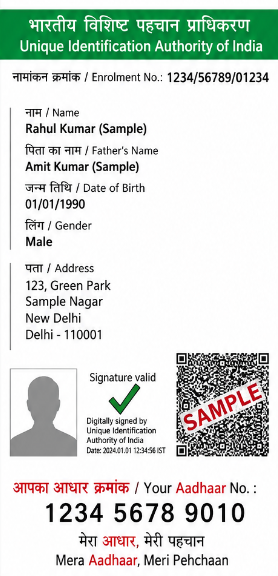
Example of a valid e-Aadhaar PDF with digital signature
Verify Signature
Check the embedded digital signature
Certificate Details
View signer and certificate information
Check Integrity
Ensure document is not modified
Fast & Easy
Get results instantly
100% Private
Your file never leaves your device
How to Verify Your e-Aadhaar PDF Signature
Verify your e-Aadhaar digital signature in just 3 simple steps.
Upload your e-Aadhaar PDF
Click Choose e-Aadhaar PDF and select the digitally downloaded e-Aadhaar PDF from your device. You can also drag and drop the PDF into the upload area.
Let PixDok analyze the PDF
PixDok reads the digital signature information embedded in the PDF and performs the available signature verification checks.
Check the verification result
If the signature is valid, PixDok displays a Signature Valid result along with certificate information and document integrity details.
What Does "Signature Valid" Mean?
A Signature Valid result means that the digital signature has successfully passed the cryptographic verification checks and the document has not been modified after signing.
What Is a Digitally Signed e-Aadhaar?
An e-Aadhaar PDF from UIDAI can contain a digital signature. It helps verify that the document was digitally signed and the content has not been altered.
Signature Verification vs Aadhaar Verification
This tool verifies the digital signature in the PDF. It does not authenticate your Aadhaar identity or verify individual identity details.
Your Privacy Matters
Verification happens entirely in your browser (in-memory). Your PDF is never uploaded, stored, or shared with our servers.
Why Verify an e-Aadhaar Digital Signature?
Digital signature verification helps you confirm the authenticity and integrity of your e-Aadhaar PDF.
Verify authenticity
Ensure the document is digitally signed
Ensure integrity
Confirm it hasn't been modified
View certificate
See signer details and certificate info
Build confidence
Useful for official and online submissions
Original PDF vs Screenshot
For digital signature verification, always prefer the original PDF file.
| File type | Digital signature verification |
|---|---|
| Original digitally signed e-Aadhaar PDF | Supported |
| PDF downloaded from an official source | Supported if digitally signed |
| Screenshot of e-Aadhaar | Not applicable |
| JPG / PNG image of Aadhaar | Not applicable |
| Scanned Aadhaar PDF | Usually no embedded original signature |
| Printed Aadhaar scanned back to PDF | Not the original digital signature |
Frequently Asked Questions
Find answers to common questions about e-Aadhaar signature verification.