

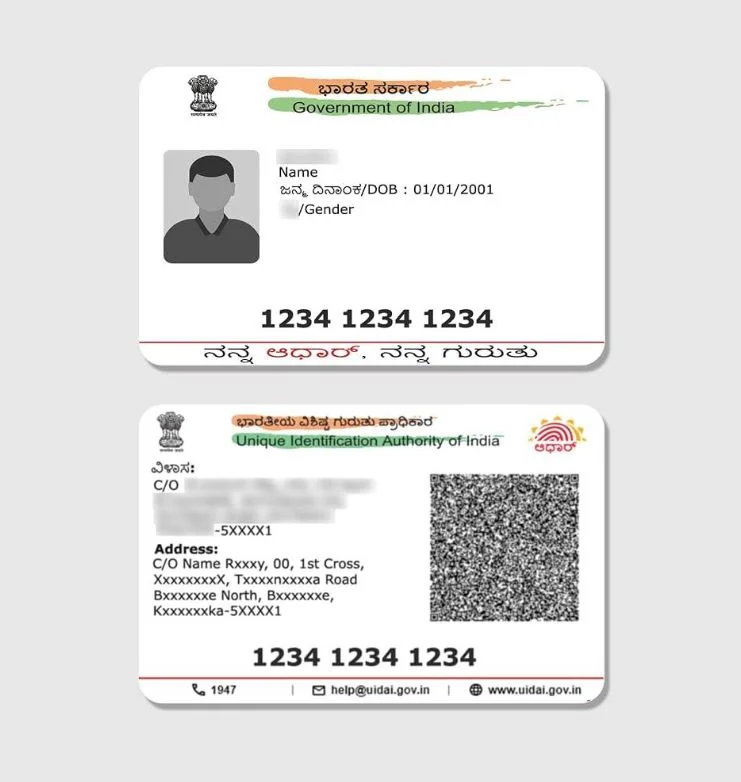
An official e-Aadhaar issued by UIDAI arrives as a full-page A4 PDF document containing official letters, regional language guidelines, and instructions. While perfect for digital archiving and official submissions, carrying an entire paper A4 sheet in your pocket or wallet is bulky, prone to tearing, and inconvenient. Converting your electronic Aadhaar into a durable, wallet-sized PVC card requires precision cropping, accurate CR80 dimension scaling, and a side-by-side print layout.
What Is an Aadhaar PDF to PVC Card Converter?
An Aadhaar PDF to PVC card converter online free utility automates the card preparation workflow. Rather than manually opening complex graphic editors like Photoshop or CorelDraw, measuring millimeter ruler guides, and guessing printer margins, PixDok performs four critical tasks in seconds:
- Unlocks the Encrypted PDF: Handles official UIDAI password decryption (Name + Birth Year) seamlessly.
- Isolates Front & Back Portions: Automatically detects and crops the front identification card (photo, name, DOB, Aadhaar number) and the back address card with the secure QR code.
- Calibrates Standard CR80 Dimensions: Scales both portions to standard pocket ID proportions (86.00 × 54.00 mm) at 300+ DPI.
- Generates Instant Print Layouts: Arranges the front and back side-by-side for direct thermal PVC printing or A4 photo paper lamination.
Ready to Format Your Aadhaar Card?
Use PixDok's automated browser tool to crop and generate a side-by-side print layout in seconds.
Open Aadhaar to PVC Tool →How to Convert Aadhaar PDF to PVC Card Online Free
Follow these simple steps to prepare your Aadhaar card PDF to PVC card print layout:
- Upload Your e-Aadhaar PDF: Click upload and select your official e-Aadhaar document downloaded from the UIDAI portal.
- Enter Your PDF Password: Type the 8-character password. For Aadhaar, this is the first 4 letters of your name in CAPITAL letters followed by your 4-digit birth year (e.g.,
SURE1990). - Automatic Crop & Preview: The tool instantly unlocks the file, detects card coordinates, and renders sharp front and back previews side-by-side.
- Fine-Tune Margins (Optional): Use simple millimeter sliders to adjust margins, crop boundaries, or horizontal card spacing if needed.
- Download & Print: Export high-resolution PNG or a print-ready PDF formatted at 100% physical scale.
Official Aadhaar Card PVC Crop Size Specifications
When preparing cards for plastic printing, adhering to standard PVC card size online free dimensions is essential for wallet fit and card reader compatibility:
| Specification | Metric Value | Imperial / Digital Equivalent |
|---|---|---|
| Card Standard | CR80 (ISO/IEC 7810 ID-1) | Standard Credit / ATM Card Size |
| Dimensions (mm) | 86.00 × 54.00 mm | 3.385 × 2.126 inches |
| Dimensions (cm) | 8.60 × 5.40 cm | Standard Wallet Card |
| Aspect Ratio | 1.593 : 1 | Standard Identity Proportion |
| Thickness | 0.76 mm | 30 mil (Standard PVC) |
| Raster Size (300 DPI) | 1016 × 638 pixels | Standard Digital Print |
| Raster Size (600 DPI) | 2031 × 1276 pixels | High-Definition Thermal Print |
Understanding the e-Aadhaar PDF Password
UIDAI secures all electronic Aadhaar PDF files with an automated encryption key. The password follows a strict 8-character convention:
- First 4 Letters of Name: The first four letters of your name as printed on the Aadhaar card, in UPPERCASE.
- 4-Digit Year of Birth: Your year of birth in
YYYYformat.
Examples:
- Name: SURESH SHARMA | Year of Birth: 1990 → Password:
SURE1990 - Name: ANIL KUMAR | Year of Birth: 1985 → Password:
ANIL1985 - Name: RIA DAS (3-letter name) | Year of Birth: 2001 → Password:
RIA2001 - Name with dots: P.K. SINGH | Year of Birth: 1978 → Password:
PKSI1978
Multi-ID Card Crop Size Comparison
Service centers, cyber cafes, and CSC operators frequently crop multiple Indian identity documents. Here is how Aadhaar compares with other cards:
- Aadhaar Card: 86.00 × 54.00 mm (Standard Pocket PVC)
- PAN Card: 85.60 × 53.98 mm (Standard CR80)
- Voter ID (e-EPIC): 86.00 × 54.00 mm (Election Commission Standard)
- Ayushman Bharat Card: 86.00 × 54.00 mm (PMJAY Health Card)
- ABHA Health Card: 86.00 × 54.00 mm (National Health Authority)
Printing Workflows: Direct PVC Printer vs Inkjet Lamination
To ensure crisp, durable results after cropping, follow these printing workflows:
Method 1: Direct-to-Card Thermal PVC Printers
If you own an Evolis, Zebra, Fargo, or Magicard card printer:
- Insert blank white CR80 PVC cards into the input hopper.
- In printer preferences, verify that orientation is set to Landscape and print scaling is set to 100% or Actual Size.
- Send the front and back layouts directly to the printer for professional, durable plastic cards.
Method 2: Inkjet Photo Paper & Thermal Pouch Lamination
For standard desktop inkjet printers (Epson L805, L3150, Canon G-series, HP):
- Print the side-by-side layout onto 180–230 GSM glossy photo paper at high quality (photo glossy setting).
- Always ensure printer scale is set to 100% (Do not scale / Fit to page off).
- Cut out the front and back card along the outer boundary lines.
- Fold or place the cards back-to-back inside a 250-micron PVC lamination pouch.
- Pass through a heated pouch laminator (110°C–130°C) for a rigid, glossy, waterproof card.
Privacy & Security Guarantee
Your Aadhaar contains sensitive biometric and demographic information. PixDok adheres to strict privacy-first engineering standards:
- End-to-End Encryption: All transfers use HTTPS / TLS 1.3 encryption.
- In-Memory Processing: Processing occurs strictly in temporary volatile memory sessions to extract layout art and generate coordinates.
- Zero Data Storage: Uploaded files are automatically purged from temporary buffers within 30 minutes.
- Disclaimer: PixDok is an independent formatting and layout utility. It does not issue, verify, or manufacture official UIDAI cards. For an official Aadhaar PVC Card with holographic micro-text, order directly from the official UIDAI portal at myaadhaar.uidai.gov.in.
Frequently Asked Questions
Yes. PixDok automatically unlocks the password-protected e-Aadhaar PDF, extracts the card segments, and scales them precisely to standard 86 × 54 mm CR80 ID dimensions for direct printing.
The password is the first 4 letters of your name in UPPERCASE letters followed by your 4-digit birth year (YYYY format). For example, SURE1990.
Standard CR80 dimensions: 86.00 × 54.00 mm (3.385 × 2.126 inches) with a standard 0.76 mm thickness.
This happens when printer scaling is set to "Fit to Printable Area" or "Shrink to Fit". Always set scaling explicitly to 100% or Actual Size in your printer settings.
No. PixDok processes files in temporary sessions without storing personal identification or demographic data.