

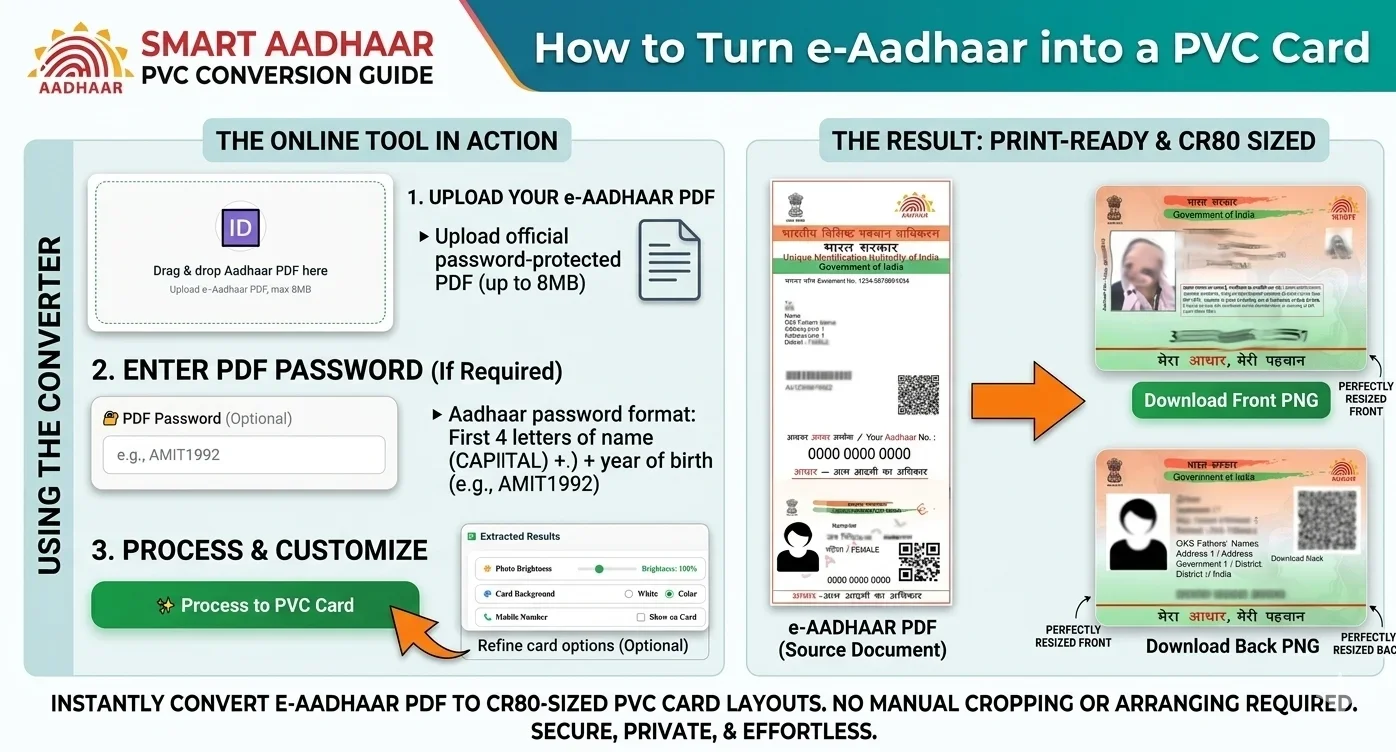
Yes, you can print a color copy of your e-Aadhaar. You can also prepare an e-Aadhaar PDF for a PVC-card-sized print layout.
However, there is an important difference between a color print or privately prepared PVC copy of e-Aadhaar and the official Aadhaar PVC Card ordered through UIDAI.
In this guide, you'll learn how to print a color Aadhaar, how to prepare an Aadhaar PDF for PVC size, what the PVC card dimensions are, whether a self-printed PVC card is an official Aadhaar PVC Card, and how to prepare your file for printing.
If you already have your e-Aadhaar PDF, you can use the PixDok Aadhaar PDF to PVC Card Maker to prepare the document for a PVC-sized layout.
Important: PixDok is an independent document-processing tool and is not affiliated with or endorsed by UIDAI. For the official Aadhaar PVC Card, use the official UIDAI service.
Can I Print a Color Aadhaar Card?
Yes. You can print your e-Aadhaar in color.
If you have downloaded your e-Aadhaar PDF, you can print it on paper using a color printer. You can also prepare the Aadhaar document for a smaller card-sized print.
A color print of e-Aadhaar is different from the official Aadhaar PVC Card issued through UIDAI.
If you want the official PVC version, UIDAI provides an online Order Aadhaar PVC Card service.
As of January 1, 2026, UIDAI's official charge for ordering an Aadhaar PVC Card is ₹75, including GST and speed-post charges. UIDAI officially revised the fee from ₹50 to ₹75 with effect from January 1, 2026.
You can check the latest information through UIDAI's official My Aadhaar portal.
Color Aadhaar Print vs Aadhaar PVC Card
| Option | What it means |
|---|---|
| Color e-Aadhaar print | A color print of your downloaded e-Aadhaar PDF |
| Privately printed PVC copy | A PVC-sized physical copy prepared from your e-Aadhaar |
| Official Aadhaar PVC Card | A PVC card ordered through UIDAI's official service |
Can I Print a PVC Aadhaar Card?
Yes, you can prepare your e-Aadhaar for a PVC-sized print.
If you want a physical card made from your e-Aadhaar PDF, the document needs to be cropped and resized to the required card format.
The basic process is:
-
Download your e-Aadhaar PDF.
-
Upload the PDF to a suitable PDF/PVC preparation tool.
-
Enter the PDF password if required.
-
Crop the Aadhaar card area.
-
Resize the output to the required card dimensions.
-
Check the front and back carefully.
-
Download the prepared output.
-
Print it using suitable card-printing equipment or a printing service.
Convert e-Aadhaar PDF to PVC Size Online
If you don't want to manually crop and resize the document using Photoshop or another design program, you can use the PixDok Aadhaar PDF to PVC Card Maker.
The tool is designed to help prepare an e-Aadhaar PDF for a PVC-card-sized layout.
Is a PVC Aadhaar Card Original?
This depends on what you mean by "PVC Aadhaar Card."
The official Aadhaar PVC Card is issued through UIDAI's official ordering service. UIDAI states that the Aadhaar PVC Card is one of the valid forms of Aadhaar, alongside the Aadhaar Letter, e-Aadhaar and Aadhaar App.
A PVC card that you privately print from your e-Aadhaar PDF is not the same product as the official UIDAI-issued Aadhaar PVC Card.
Therefore, a privately printed card should not be advertised or represented as an official UIDAI-issued PVC Card.
The official UIDAI PVC Card includes security features such as a secure QR code, micro text, ghost image, issue/print details, embossed Aadhaar logo and guilloche pattern.
If you specifically need the official Aadhaar PVC Card, order it through UIDAI.
How Do I Print a PVC Aadhaar Card?
You can follow these steps if you already have your e-Aadhaar PDF.
Step 1: Download your e-Aadhaar
First, download your e-Aadhaar through the official UIDAI service.
Keep the original PDF securely stored.
Step 2: Prepare the PDF
The e-Aadhaar PDF may not be arranged in the exact format required for a PVC-card-sized print.
You'll normally need to extract and crop the relevant card area.
Step 3: Crop and resize the Aadhaar
You can use an online tool instead of manually editing the document in Photoshop.
Open PixDok Aadhaar PDF to PVC Card Maker
Upload the PDF, enter the PDF password when required, and process the document.
Step 4: Check the result
Before printing, carefully check:
-
Name
-
Date of birth
-
Gender
-
Aadhaar number
-
Photograph
-
QR code
-
Address
-
Front and back alignment
-
Text readability
Do not print an output without checking that the information has been extracted correctly.
Step 5: Print the card
Once the output is ready, you can use it with a suitable PVC card printer or printing service.
If you are using A4 paper instead of a PVC card printer, you can arrange multiple card-sized outputs on an A4 sheet before printing.
Convert your e-Aadhaar PDF into an official wallet-sized CR80 PVC card format instantly.
Convert Aadhaar to PVC →
What Is the Aadhaar PVC Card Size?
The Aadhaar PVC Card uses a compact, credit-card-sized format.
UIDAI documentation contains specifications for Aadhaar PVC cards, and dimensions can vary slightly between technical specifications. For practical card-printing workflows, the commonly referenced CR80 format is approximately 85.6 × 54 mm.
Because different printer and card-printing systems can use slightly different templates, always check the dimensions required by your specific printer or card stock.
The important point is that you should not simply guess the crop area from the PDF.
A dedicated PVC-card layout tool can make the preparation process easier.
Can I Print Aadhaar on A4 Paper?
Yes.
You can print your e-Aadhaar on normal A4 paper using a color printer.
If you want to print a PVC-sized design on A4, you can first prepare the card at the required dimensions and then arrange multiple copies on an A4 page.
For example, a CSC centre or cyber cafe may prepare several card-sized layouts on a single A4 sheet before sending the sheet to a printer.
The exact number of cards that fit on one sheet depends on:
-
Card dimensions
-
Printer margins
-
Required spacing
-
Cutting requirements
-
Printer paper size
Can I Print Aadhaar on a Normal Printer?
Yes, you can print a color copy of e-Aadhaar using a normal color printer.
However, a normal printer generally prints on paper.
If you want a durable PVC card, you'll need suitable PVC card-printing equipment or a professional printing service.
You can prepare the card layout digitally first and then use the resulting file with your preferred printing setup.
What Is the Difference Between e-Aadhaar and Aadhaar PVC Card?
e-Aadhaar
e-Aadhaar is the electronic version of Aadhaar that can be downloaded and stored digitally or printed.
Aadhaar PVC Card
The Aadhaar PVC Card is a durable, credit-card-sized form of Aadhaar that can be ordered through UIDAI.
UIDAI states that its different forms of Aadhaar, including the Aadhaar PVC Card and e-Aadhaar, are equally valid and acceptable.
The official PVC Card also contains multiple security features.
How Much Does the Official Aadhaar PVC Card Cost?
As of January 1, 2026, the official Aadhaar PVC Card costs ₹75.
UIDAI revised the service fee from ₹50 to ₹75 through an official memorandum. The revised ₹75 charge includes taxes, and UIDAI's current online service information also lists ₹75 for the PVC Card service.
The official UIDAI information states that the charge includes GST and speed-post charges.
For the latest ordering information, use UIDAI's official My Aadhaar service.
Is It Safe to Convert Aadhaar PDF to PVC Size Online?
Aadhaar contains sensitive personal information, so privacy should always be considered when using an online document-processing service.
Before uploading an Aadhaar PDF to any website, check:
-
How files are processed
-
Whether files are stored
-
How long files remain on the server
-
Whether files are automatically deleted
-
Whether HTTPS is enabled
-
Whether you actually need to upload the document
Never share your Aadhaar PDF, password, OTP or other sensitive information unnecessarily.
If you're processing somebody else's Aadhaar, make sure you have appropriate permission to do so.
Why Use an Aadhaar PDF to PVC Card Tool?
Manually preparing an Aadhaar PDF for card printing can be time-consuming.
You may need to:
-
Find the correct card area
-
Crop the document
-
Resize it
-
Prepare the front and back
-
Check the alignment
-
Create a print-ready layout
An online tool can simplify these steps.
Try PixDok's Aadhaar PDF to PVC Card Maker
Frequently Asked Questions
Yes. You can print your downloaded e-Aadhaar in color. A color print is different from the official Aadhaar PVC Card issued through UIDAI.
You can prepare your e-Aadhaar for a PVC-sized print. However, a privately printed PVC copy should not be represented as an official UIDAI-issued Aadhaar PVC Card.
The official Aadhaar PVC Card ordered through UIDAI is an official form of Aadhaar. A privately printed PVC copy made from an e-Aadhaar PDF is not the same product as the official UIDAI PVC Card.
Download your e-Aadhaar PDF, crop the relevant card area, resize it to the required card format, check the output and print it using suitable PVC card-printing equipment or a printing service.
The Aadhaar PVC Card uses a credit-card-sized format. CR80 is commonly around 85.6 × 54 mm, although specific UIDAI technical specifications may use slightly different dimensions.
As of January 1, 2026, UIDAI's official Aadhaar PVC Card service costs ₹75, including GST and speed-post charges.
Yes. You can use an online PDF cropping and resizing tool instead of manually editing the document in Photoshop.
Try the free PixDok Aadhaar PDF to PVC Card Maker.
Prepare Your Aadhaar PDF for PVC Printing
Already have your e-Aadhaar PDF and want to prepare it for a PVC-sized layout?
Use PixDok's Aadhaar PDF to PVC Card Maker →
PixDok helps you prepare the document for your printing workflow without requiring Photoshop or other desktop editing software.
Disclaimer: PixDok is an independent online document-processing platform and is not affiliated with, sponsored by, or endorsed by the Unique Identification Authority of India (UIDAI). For an official Aadhaar PVC Card, use the official UIDAI ordering service.