

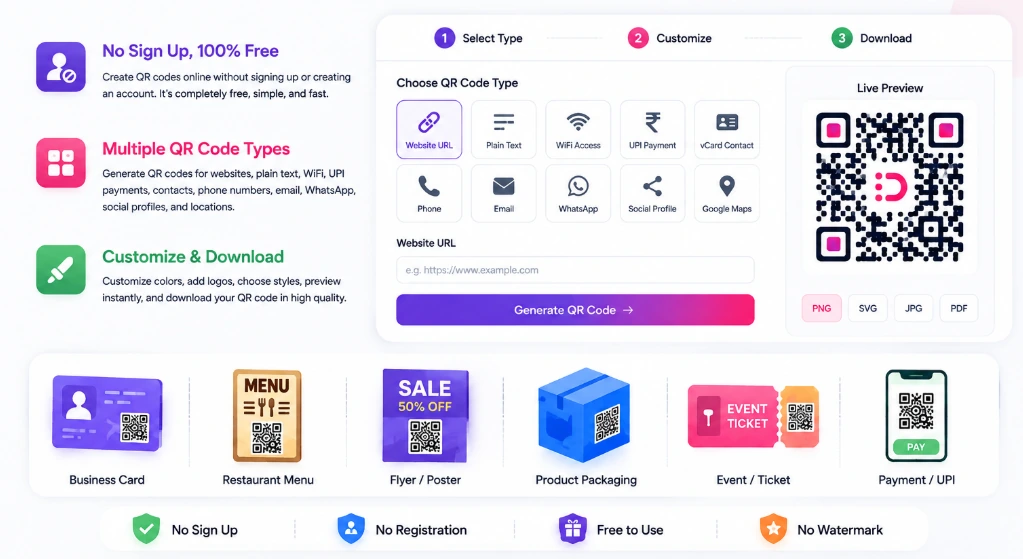
Create QR codes for documents quickly and easily with PixDok’s free online QR Code Generator. Generate a QR code from a website link, PDF link, text, contact information, WiFi details, UPI payment information, and more directly from your browser no registration required.
No software installation or registration required.
Free QR Code Generator for Documents
Need to share a document or digital resource quickly? A QR code makes it easy for people to access information using their smartphone camera.
PixDok’s Free QR Code Generator lets you create, customize, preview, and download high-quality QR codes online. It supports website URLs, plain text, PDF links, WiFi, UPI payments, vCards, WhatsApp, email, phone numbers, social profiles, Google Maps, and more.
Process your files with studio quality in your browser with zero registration required.
Try PixDok Tool NowExplore PixDok QR & Barcode Tools
Looking for more than a QR code?
Visit the PixDok QR & Barcode Tools page to explore the complete code-generation suite.
You can also use the Barcode Generator to create retail and inventory barcodes such as Code 128, EAN-13, UPC-A, Code 39, and ITF.
How to Create a QR Code for a Document
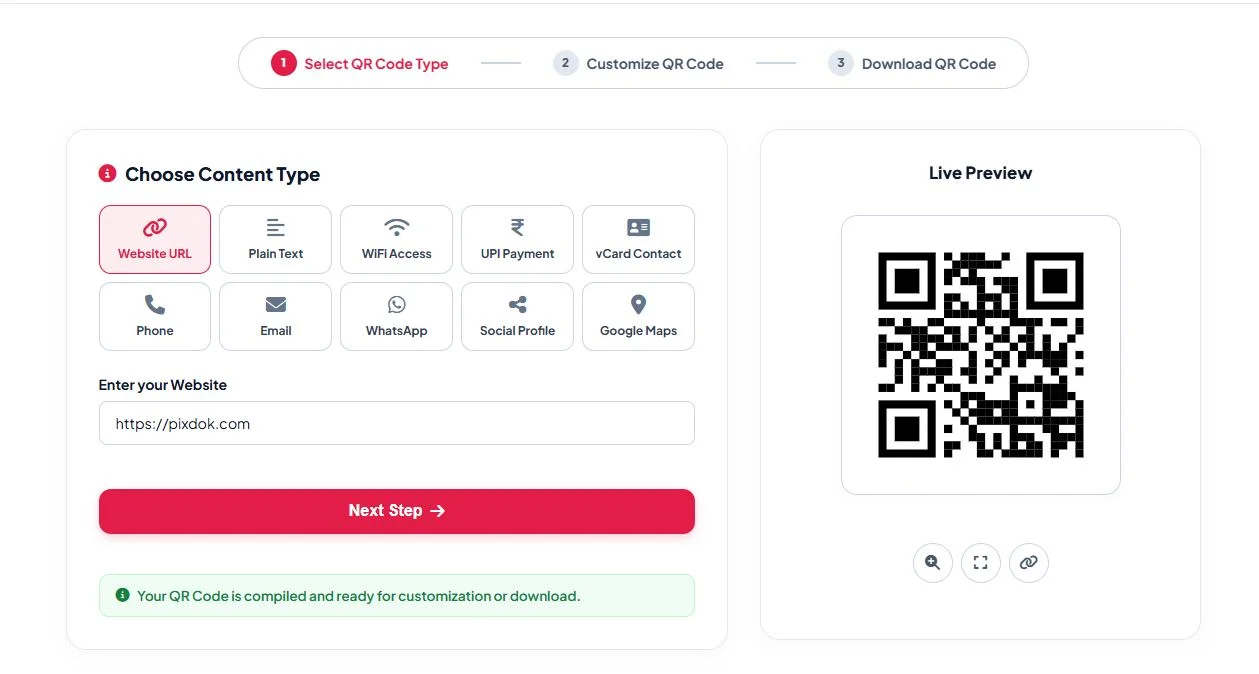
1. Open the QR Code Generator
Open the PixDok QR Code Generator in your browser.
2. Select Your Content Type
Choose the type of information you want to encode. Depending on your use case, you can create a QR code for a website URL, PDF link, plain text, WiFi, UPI payment, contact information, WhatsApp, email, social profile, or location.
3. Enter Your Information
Enter the URL, text, contact information, or other supported data.
4. Customize Your QR Code
Customize the appearance of your QR code with colors, gradients, dot styles, corner styles, margins, and an optional logo. PixDok also provides a live preview.
5. Download Your QR Code
Download your finished QR code as PNG, JPG, SVG, or a print-ready PDF, depending on your needs.
QR Code for PDF Documents
If you want to share a PDF document through a QR code, you can encode the public URL of the PDF into the QR code.
When someone scans the QR code, their phone can open the PDF URL in a browser.
This is useful for:
-
Digital documents
-
Application forms
-
Educational materials
-
Business documents
-
Product information
-
Printed notices
-
Flyers and posters
-
Menus
-
Event information
Important: A QR code does not automatically upload or store a PDF. For a PDF QR code, the document normally needs to be available at a URL that the QR code can encode.
What Can You Create a QR Code For?
PixDok supports multiple QR code use cases, including:
Website URL
Create a QR code that opens a website, webpage, menu, registration form, or other URL.
PDF Document
Create a QR code containing a link to a PDF document.
Plain Text
Encode notes, instructions, messages, or other text directly into a QR code.
WiFi
Create a QR code that allows compatible devices to connect to a WiFi network.
UPI Payment
Create a UPI payment QR code containing the payment information you provide.
vCard Contact
Create a QR code that can share contact information.
Create a QR code that opens a WhatsApp conversation.
Create a QR code containing an email address and optional message information.
Google Maps
Create a QR code that directs users to a location.
QR Code Generator for Business and Printing
QR codes can be useful for both digital and printed materials.
You can use them on:
-
Business cards
-
Flyers
-
Posters
-
Menus
-
Product packaging
-
Invoices
-
Printed documents
-
Event materials
-
Marketing materials
-
Signboards
For professional printing, PixDok supports SVG export, which provides scalable vector graphics suitable for print layouts.
QR Code vs Barcode
QR codes and barcodes serve different purposes.
A QR code can store or provide access to information such as URLs, text, WiFi details, payment information, and contact details.
A barcode is commonly used for product identification, inventory, retail, and logistics.
If you need a traditional product or inventory barcode, use PixDok's Free Barcode Generator. PixDok supports formats including Code 128, EAN-13, UPC-A, Code 39, and ITF.
Frequently Asked Questions
Yes. PixDok provides a free online QR Code Generator that can be used without registration.
Yes. You can create a QR code containing the URL of a PDF document.
No. PixDok's QR Code Generator works directly in your web browser.
Yes. The QR Code Generator can be used from smartphones, tablets, laptops, and desktop computers.
Yes. PixDok supports several export formats, including PNG, JPG, SVG, and PDF.
Yes. Use the PixDok Barcode Generator if you need a traditional product or inventory barcode.
Visit the PixDok QR & Barcode Tools page to explore the complete QR and barcode suite.
Create Your QR Code Online
Ready to create a QR code?
Create a Free QR Code with PixDok →
Need a product barcode instead?
Or explore everything in one place: